
01
Version drift
Version drift triggers rework when one platform updates and the other doesn’t.
Your Common Data Environments should work together. CDE Connect automates file sync and metadata mapping across platforms, so teams always share the right dataset.
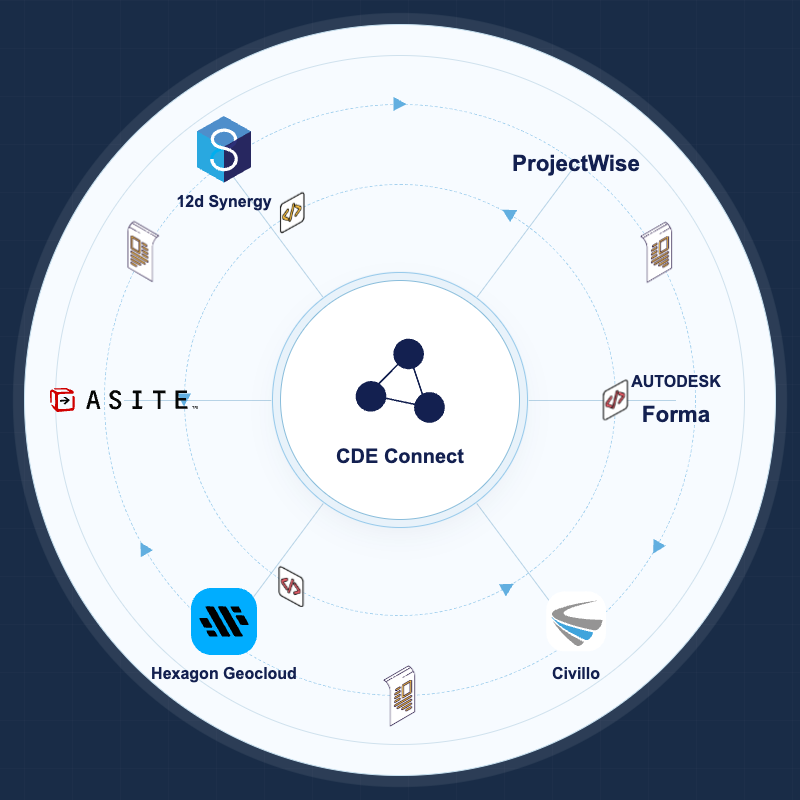



Infrastructure projects bring together teams that use different platforms. Clients may keep records in SharePoint, engineers work in Bentley ProjectWise, delivery teams coordinate in Autodesk Forma, and correspondence sits in Asite. Contractors may use a separate CDE.
Each team can keep the platform it already uses. The challenge is moving project information reliably between those teams and systems.
Book a demo
Project Team CDE 1
Project Team CDE 2
Project Team CDE 3

Project Team CDE 4
CDE Connect
When project teams work across multiple platforms, keeping information aligned becomes manual work and small gaps quickly turn into rework.
Version drift triggers rework when one platform updates and the other doesn’t.
Manual exports and uploads slow delivery and introduce avoidable errors under deadline pressure.
Metadata is often lost during handover, making it hard to track status and suitability.
Audit gaps appear during QA and claims because it’s unclear what was issued, when, and by whom.
It works alongside the platforms your teams already rely on, helping information move between systems while every organisation continues working within its own CDE.
Built for infrastructure and civil engineering projects, from roads and rail to water, energy and land development.
Explore common ways infrastructure teams can keep information moving across project platforms and organisational boundaries.
Exchange information between Common Data Environments without forcing everyone onto the same system.
Let’s talk about your environments.
Book a demoSeymour
Whyte
CDE Connect has been a gamechanger. It has allowed us to have a lot of control.
CDE Connect is developed and operated by 12d Synergy Pty Ltd.
12d Synergy is certified to ISO 27001:2022.
Host your exchanges in Australia, the UK, the EU or the US.
Build on Microsoft Azure infrastructure.
YOUR ENVIRONMENTS. CONNECTED.
See how CDE Connect fits your information exchange.
Book a demoUse case
Move approved drawings, models and associated metadata from the design environment into the platform used by the delivery team.
Delivery teams work from the latest approved design information, without manual re-uploads between platforms.
Discuss your projectUse case
[CONFIRM] Approved expanded use-case copy not present in supplied package.
[CONFIRM] Approved outcome and customer example.
Discuss your projectUse case
[CONFIRM] Approved expanded use-case copy not present in supplied package.
[CONFIRM] Approved outcome and customer example.
Discuss your projectUse case
[CONFIRM] Approved expanded use-case copy not present in supplied package.
[CONFIRM] Approved outcome and customer example.
Discuss your projectIntegration scope
Every organisation keeps its own CDE. CDE Connect handles the exchange.
Integration scope
Every organisation keeps its own CDE. CDE Connect handles the exchange.
Integration scope
Every organisation keeps its own CDE. CDE Connect handles the exchange.
Integration scope
Every organisation keeps its own CDE. CDE Connect handles the exchange.
Integration scope
Every organisation keeps its own CDE. CDE Connect handles the exchange.
Integration scope
Every organisation keeps its own CDE. CDE Connect handles the exchange.
Integration scope
Every organisation keeps its own CDE. CDE Connect handles the exchange.